Automatic detection
Flanking is recalculated as characters move around the grid.
Flanking is recalculated as characters move around the grid.
Automatic flanking detection for PTU 1.05 and D&D 5e 2014. Assign teams, move your tokens, and see vulnerable creatures marked directly on the map.
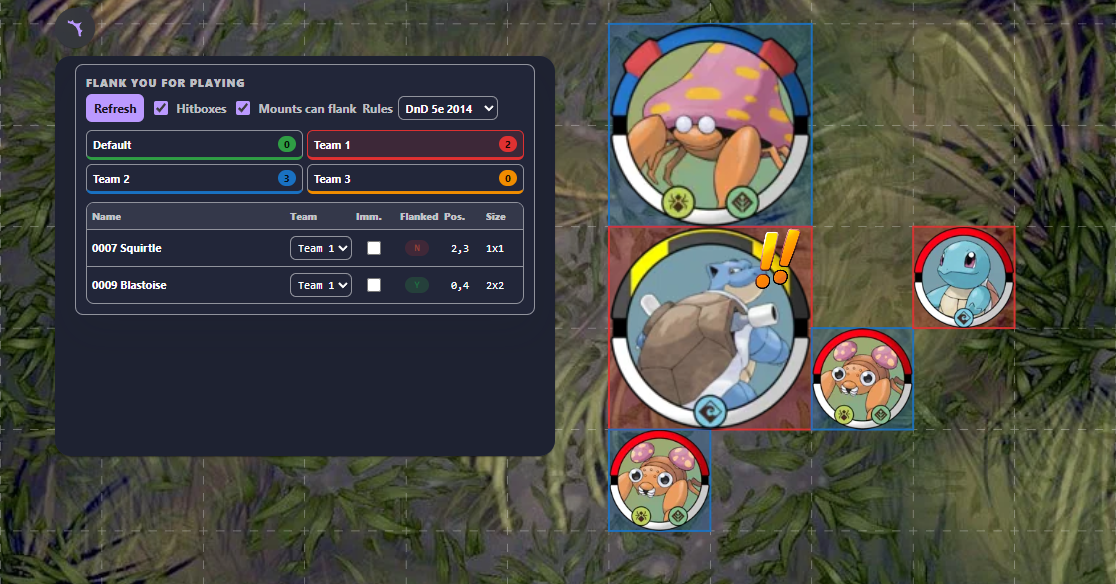
Colored hitboxes reveal team membership; the double-exclamation marker identifies a flanked creature.
https://flankyou.onrender.com/manifest.json
Select PTU 1.05 or D&D 5e 2014 for the room.
Use the panel or token context menu to group allies together.
Mark immune creatures and decide whether mounts can flank.
Move tokens normally; the overview and map markers update the result.
Flank You evaluates enemies occupying cells adjacent to the target. The number of required contact cells scales with the target’s longest side, supporting creatures from 1×1 through 4×4.
A valid flank requires at least two usable enemies and enough combined contact around the target.
Two allied attackers must threaten the target from opposite regions around its occupied space.
| Control | What it does |
|---|---|
Refresh | Forces the token overview and flanking state to be recalculated. |
Hitboxes | Toggles colored outlines matching each token’s assigned team. |
Mounts can flank | Includes mounted creatures among eligible flank participants. |
Rules | Switches the room between PTU 1.05 and D&D 5e 2014 calculations. |
Team tabs | Filters the compact overview and displays the number of tokens in each team. |
Immune | Prevents an individual token from ever receiving the flanked state. |
Select one or more tokens and open the Flank You context menu to assign the whole selection to a team or change its immunity. The same values can be edited token by token from the extension panel.
Need help, found a bug, or want to suggest an improvement? Choose whichever channel works best for you.
@citron3400
Join server
GitHub Issues
Report a reproducible bug or request a feature.
Open an issue