Fresh IDs
Generate new identifiers and preserve attachment links between copied items.
Generate new identifiers and preserve attachment links between copied items.
Paste copied Owlbear Rodeo items with extra control, directly from the context menu. Decide what changes and what stays untouched before items return to your scene.
https://alinktothepaste.onrender.com/manifest.json
Select one or more items in Owlbear Rodeo and copy them as usual.
Open the scene context menu with no item selected and choose Special Paste.
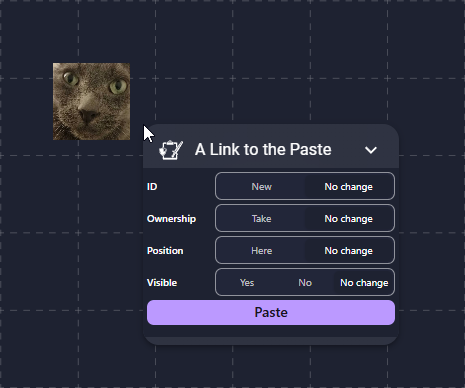
Set the ID, ownership, position and visibility behavior you need.
Press Paste. A notification confirms how many items were added.
New / No changeNew assigns a new unique ID to every pasted item. Internal attachment references are updated with the new IDs. No change retains the copied identifiers.
Take / No changeTake makes you the creator of every pasted item. No change keeps existing owners and only fills in missing ownership information.
Here / No changeHere moves the pasted items to the center of your current view. No change preserves their copied positions.
Yes / No / No changeForce every pasted item to be visible or hidden, or retain the visibility stored in the copied data.
The extension reads clipboard text only when you submit the paste form. It parses the copied JSON locally, applies your selected transformations, and adds the resulting items to the current Owlbear Rodeo scene.
No account, API key or remote storage is required by the paste workflow.
Need help, found a bug, or want to suggest an improvement? Choose whichever channel works best for you.
@citron3400
Join server
GitHub Issues
Report a reproducible bug or request a feature.
Open an issue